RadioPlan ConnectivityLines: Difference between revisions
Jump to navigation
Jump to search
(Expanded on the documentation of ConnectivityLines) |
mNo edit summary |
||
| (One intermediate revision by one other user not shown) | |||
| Line 5: | Line 5: | ||
ConnectivityLines supports two modes: | ConnectivityLines supports two modes: | ||
* | * RadioNet without a master radio | ||
* | * RadioNet with a master radio | ||
Each connection is represented as a '''split line''': | Each connection is represented as a '''split line''': | ||
| Line 13: | Line 13: | ||
* The other half indicates whether the ''target (to) radio'' can reach the ''source (from) radio''. | * The other half indicates whether the ''target (to) radio'' can reach the ''source (from) radio''. | ||
=== | === RadioNet without a Master Radio === | ||
When no master radio is configured: | When no master radio is configured: | ||
| Line 20: | Line 20: | ||
[[File:Radio connectivity lines without master Radio in RadioNet.png|Radio connectivity lines without master Radio in RadioNet|center|694x694px]] | [[File:Radio connectivity lines without master Radio in RadioNet.png|Radio connectivity lines without master Radio in RadioNet|center|694x694px]] | ||
=== | === RadioNet with a Master Radio === | ||
When a master radio is configured: | When a master radio is configured: | ||
* Connectivity is '''only shown between each radio and the master radio'''. | * Connectivity is '''only shown between each radio and the master radio'''. | ||
* No direct connectivity lines are displayed between non-master radios. | * No direct connectivity lines are displayed between non-master radios. | ||
* This simplifies the visualization and emphasizes the central role of the master radio in the | * This simplifies the visualization and emphasizes the central role of the master radio in the RadioNet. | ||
[[File:RadioConnectivity MasterRadio.png|center|697x697px]] | [[File:RadioConnectivity MasterRadio.png|center|697x697px]] | ||
| Line 52: | Line 52: | ||
|Color | |Color | ||
|Display color for when we are unable to determine signal level for the radio | |Display color for when we are unable to determine signal level for the radio | ||
|- | |||
|LineThickness | |||
|double | |||
|Line thickness for the rendered lines | |||
|} | |} | ||
Latest revision as of 17:36, 25 March 2026
ConnectivityLines visualizes the connectivity between radios within the same RadioNet. It provides a graphical representation of whether radios can communicate with each other based on defined thresholds and network configuration.
The functionality is controlled with the IConnectivityLines interface.
ConnectivityLines supports two modes:
- RadioNet without a master radio
- RadioNet with a master radio
Each connection is represented as a split line:
- One half indicates whether the source (from) radio can reach the target (to) radio.
- The other half indicates whether the target (to) radio can reach the source (from) radio.
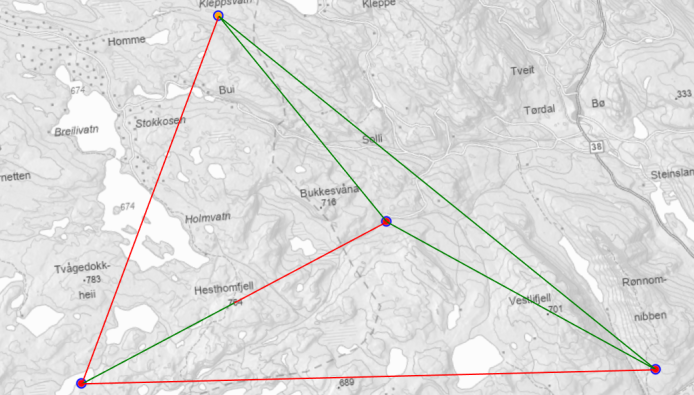
RadioNet without a Master Radio
When no master radio is configured:
- Connectivity lines are drawn between all possible pairs of radios in the RadioNet.

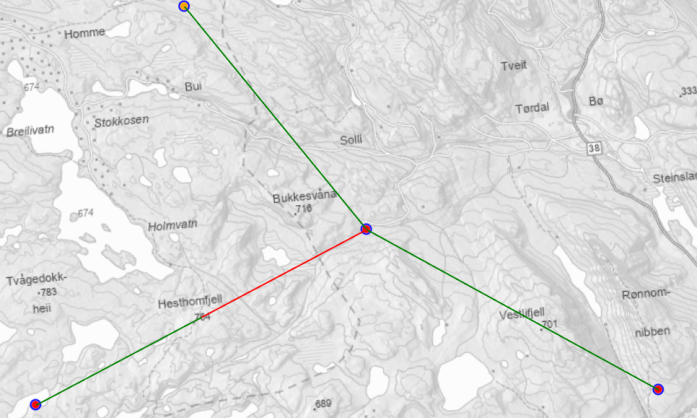
RadioNet with a Master Radio
When a master radio is configured:
- Connectivity is only shown between each radio and the master radio.
- No direct connectivity lines are displayed between non-master radios.
- This simplifies the visualization and emphasizes the central role of the master radio in the RadioNet.

Settings
| Property | Type | Description |
|---|---|---|
| Threshold | Decibel | Defines the signal strength cutoff for what is considered “coverage.” |
| HasConnectionColor | Color | Display color for has coverage |
| NoConnectionColor | Color | Display color for no coverage |
| HasNoSignalLevelColor | Color | Display color for when we are unable to determine signal level for the radio |
| LineThickness | double | Line thickness for the rendered lines |